# Step 11: Set up webhooks

Digital River uses [webhooks](https://docs.digitalriver.com/digital-river-api/order-management/events-and-webhooks-1/webhooks) to notify the app when events occur. &#x20;

### Register a client webhook endpoint to set up webhook integration between Salesforce and Digital River

To register the Client Webhook Endpoint:

1. Log in to the [Digital River Dashboard](https://docs.digitalriver.com/digital-river-api/administration/dashboard).
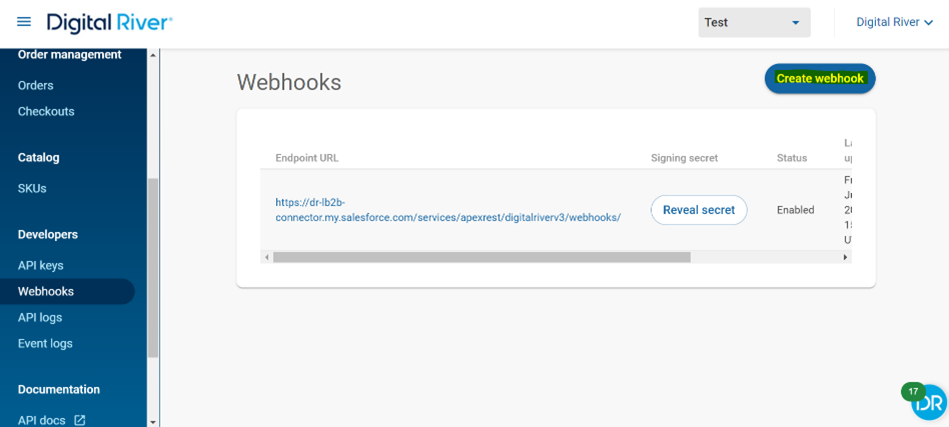
2. Go to **Webhooks** and select **Create webhook**.\
   &#x20;<img src="https://4095141294-files.gitbook.io/~/files/v0/b/gitbook-legacy-files/o/assets%2F-MS-2crEBZIcuq_A3pl1%2F-Md39bxmbIXxKcxPO1FZ%2F-Md39goiaskU4RnuTa5L%2FCreate%20webhook.png?alt=media&#x26;token=50447e6f-2418-4788-a414-04a96ca4051f" alt="" data-size="original">&#x20;
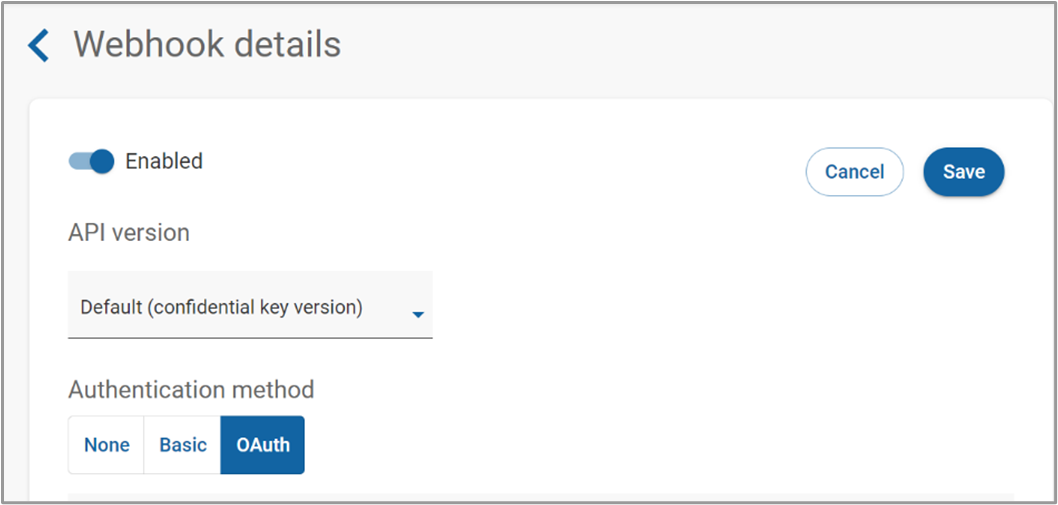
3. Set up the **OAuth Integration** and select **OAuth** as the authentication method. \ <img src="https://4095141294-files.gitbook.io/~/files/v0/b/gitbook-legacy-files/o/assets%2F-MS-2crEBZIcuq_A3pl1%2F-MdbSw_MiOISP8ELEG1Y%2F-Mdb_G_b2qs8PHhn587l%2FOAuth%20integration%202.png?alt=media&#x26;token=94b2b4a2-0654-4385-a053-5360a9dbb9f1" alt="" data-size="original">&#x20;
4. Complete the following fields:

| Field name     | Description                                                                                                                                                                                  |
| -------------- | -------------------------------------------------------------------------------------------------------------------------------------------------------------------------------------------- |
| Token Endpoint | https\://<\<SF\_OAuth\_Access\_Token\_Endpoint>                                                                                                                                              |
| Endpoint URL   | https\://<\<SF\_My\_Domain\_Name>>/services/apexrest/digitalriverv3/webhooks/                                                                                                                |
| Client ID      | <p>Client Id (Consumer Key) of the Connected App "Salesforce DigitalRiver Integration" <br>which was created in the <a href="step-8-set-up-digital-river-fulfillments">previous step</a></p> |
| Client Secret  | Client Secret of the Connected App "Salesforce DigitalRiver Integration"                                                                                                                     |
| Username       | Integration User's username                                                                                                                                                                  |
| Password       | <\<IntegrationUserPassword>><\<IntegrationUserSecurityToken>>                                                                                                                                |

![](https://4095141294-files.gitbook.io/~/files/v0/b/gitbook-legacy-files/o/assets%2F-MS-2crEBZIcuq_A3pl1%2F-MdbgxcX_axuWpW-tz8i%2F-Mdbhm292N0ocQWFauIf%2FOAuth%20integration%203.png?alt=media\&token=2999cbb5-dd74-4d93-b910-b1820a79f625)

![](https://4095141294-files.gitbook.io/~/files/v0/b/gitbook-legacy-files/o/assets%2F-MS-2crEBZIcuq_A3pl1%2F-MdbgxcX_axuWpW-tz8i%2F-Mdbhb-c4BuO4m3wO0g4%2FOAuth%20integration%204.png?alt=media\&token=a0ea958f-cee0-45c6-b8f3-36aeba6e4fab)

{% hint style="info" %}
The **Token Endpoint** for the **Sandbox** environment is`https://test.salesforce.com/services/oauth2/token and https://login.salesforce.com/services/oauth2/token` for the **Production** environment.&#x20;
{% endhint %}

{% hint style="info" %}
The **Endpoint URL** address named **MyDomain URL** should be `https://example-domain.my.salesforce.com` and not the Lightning Force URL `https://example-domain.lightning.force.com`
{% endhint %}

### Webhook event types

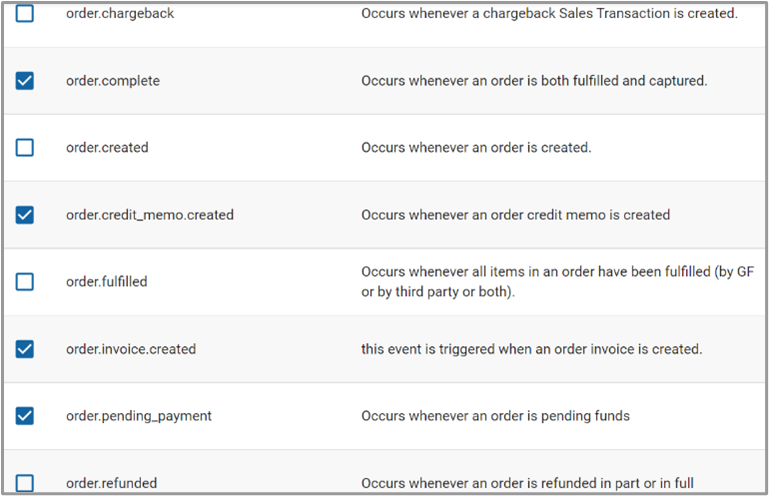
The Digital River Salesforce Lightning app supports the following out of the box (OOTB) webhook events:

* `order.accepted`
* `order.complete`
* `order.pending_payment`
* `order.review_opened`
* `order.blocked`
* `order.credit_memo.created`
* `order.invoice.created`

Ensure that all the supported Webhook events (Event types) that need to be sent to the configured Endpoint URL are selected (and saved) in the [Event types](https://docs.digitalriver.com/digital-river-api/order-management/events-and-webhooks-1/events-1#event-types) section located in the Digital River [Dashboard's webhook](https://docs.digitalriver.com/digital-river-api/administration/dashboard/developers/webhooks) section.

<div align="left"><img src="https://4095141294-files.gitbook.io/~/files/v0/b/gitbook-legacy-files/o/assets%2F-MS-2crEBZIcuq_A3pl1%2F-Md3BfMcm9sbWjPa22gd%2F-Md3C5DjZdIt9YS-YP7g%2FWebhook%205.png?alt=media&#x26;token=3415888d-14e7-4ed0-ae6b-8de818c6769d" alt=""></div>

<div align="left"><img src="https://4095141294-files.gitbook.io/~/files/v0/b/gitbook-legacy-files/o/assets%2F-MS-2crEBZIcuq_A3pl1%2F-Md3BfMcm9sbWjPa22gd%2F-Md3C2DWXLdTx-q3uWkG%2FWebhook%204.png?alt=media&#x26;token=64ade1cb-6432-4935-8da9-532b89e42e10" alt=""></div>

[<br>](https://docs.digitalriver.com/salesforce-b2b/v/2.1.1/integrating-the-digital-river-salesforce-b2b-commerce-app/step-8-set-up-digital-river-fulfillments)