> For the complete documentation index, see [llms.txt](https://docs.digitalriver.com/digital-river-api-reference/llms.txt). Markdown versions of documentation pages are available by appending `.md` to page URLs; this page is available as [Markdown](https://docs.digitalriver.com/digital-river-api-reference/2021-12-13/orders/order-basics.md).
# Order basics
Learn more about the orders resource.
[Orders ](/digital-river-api-reference/2021-12-13/orders.md)handle customers' purchases. When you create an order, you instruct Digital River, the authorized reseller, to send an authorization request to start the collection process.
The data of an order persist, acting as a permanent record of the sale, which Digital River must maintain for auditing purposes.
An order maintains an enduring record of when it was placed, a [charge is created](/digital-river-api-reference/2021-12-13/charges/charge-basics.md#how-a-charge-is-created) and [captured](/digital-river-api-reference/2021-12-13/charges/charge-basics.md#captures), a [refund ](https://docs.digitalriver.com/digital-river-api/order-management/returns-and-refunds-1/refunds)is processed, and other key events in the [order lifecycle](#the-order-lifecycle) occur. More specifically, an order persists:
* The total [refunded](/digital-river-api-reference/2021-12-13/charges/charge-basics.md#refunds), [cancelled](/digital-river-api-reference/2021-12-13/charges/charge-basics.md#cancels), and [captured ](/digital-river-api-reference/2021-12-13/charges/charge-basics.md#captures)payment amounts
* A [charge](/digital-river-api-reference/2021-12-13/charges/charge-basics.md) containing a [payment source](https://docs.digitalriver.com/digital-river-api/payments/payment-sources), an amount charged to that source, and the [state of the charge](/digital-river-api-reference/2021-12-13/charges/charge-basics.md#the-charge-lifecycle)
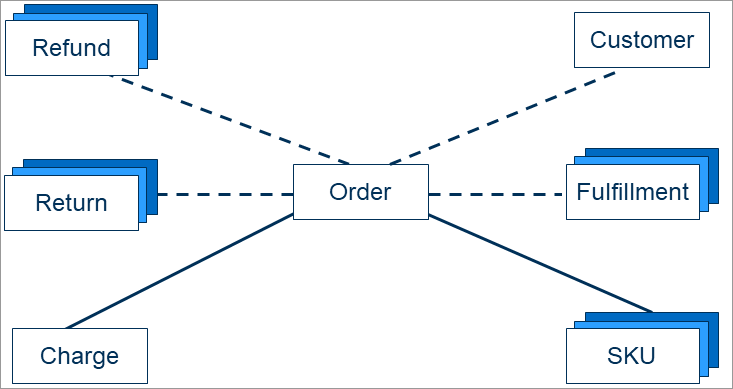
The following diagram depicts the relationship between an order and other resources in the Digital River APIs.
To ensure that your integration is functioning properly, you can create test orders using the information on the [Testing Scenarios](https://docs.digitalriver.com/digital-river-api/payments/testing-scenarios) page.
## The orders resource
In the following section, you'll find information on some of an [order's](/digital-river-api-reference/2021-12-13/orders.md) attributes and how you might use them in downstream requests. For a complete list, refer to the [Orders API](/digital-river-api-reference/2021-12-13/orders.md) reference documentation.
### Unique identifier
An [order ](/digital-river-api-reference/2021-12-13/orders.md)contains a unique `id`. You can use this identifier when [initiating physical fulfillments](https://docs.digitalriver.com/digital-river-api/integration-options/checkouts/handling-digital-river-coordinated-fulfillments/global-fulfillments), [cancelling shipments](https://docs.digitalriver.com/digital-river-api/integration-options/checkouts/handling-digital-river-coordinated-fulfillments/instructing-digital-to-cancel-items), [capturing and cancelling payments](https://docs.digitalriver.com/digital-river-api/order-management/informing-digital-river-of-a-fulfillment), [creating physical returns](https://docs.digitalriver.com/digital-river-api/order-management/returns-and-refunds-1/returns/digital-river-coordinated-returns), [handling third-party returns](https://docs.digitalriver.com/digital-river-api/order-management/returns-and-refunds-1/returns/creating-a-return), and [issuing refunds](https://docs.digitalriver.com/digital-river-api/order-management/returns-and-refunds-1/refunds/issuing-refunds).
{% tabs %}
{% tab title="Order" %}
```javascript
{
"id": "177452480336",
...
```
{% endtab %}
{% endtabs %}
### Ship to values
An order's `shipTo` values are displayed on [invoices and credit memos](https://docs.digitalriver.com/digital-river-api/order-management/accessing-invoices-and-credit-memos).
```javascript
...
"customerId": "987654321",
...
"shipTo": {
"address": {
"line1": "10380 Bren Rd W",
"line2": "string",
"city": "Minnetonka",
"postalCode": "55129",
"state": "MN",
"country": "US"
},
"name": "Jane Doe",
"phone": "952-111-1111",
"email": "jdoe@digitalriver.com",
"organization": "Digital River"
},
```
### Amounts, fees, and taxes
The total amount, fees, taxes, and other order costs are the same as those presented to customers when they confirm the purchase. You can retrieve these values and display them on the customer's order confirmation page.
```javascript
...
"totalAmount": 177.67,
"subtotal": 172.5,
"totalFees": 0.0,
"totalTax": 5.17,
"totalDuty": 0.0,
"totalDiscount": 7.5,
"totalShipping": 5.0,
...
```
### Line items
Digital River assigns each of an [order's ](/digital-river-api-reference/2021-12-13/orders.md)`items[]` a unique `id`. You need this identifier when [capturing and cancelling payments](https://docs.digitalriver.com/digital-river-api/order-management/informing-digital-river-of-a-fulfillment), [handling third-party returns](https://docs.digitalriver.com/digital-river-api/order-management/returns-and-refunds-1/returns/creating-a-return), and [issuing refunds](https://docs.digitalriver.com/digital-river-api/order-management/returns-and-refunds-1/refunds/issuing-refunds).
Depending on how you [send product data in checkouts](https://docs.digitalriver.com/digital-river-api/integration-options/checkouts/creating-checkouts/describing-the-items#sending-product-data), each of an order's `items[]` also contains either a [`skuId` ](https://docs.digitalriver.com/digital-river-api/product-management/skus#skus)or a [`productDetails` ](https://docs.digitalriver.com/digital-river-api/product-management/skus#product-details)object.
In addition, these `items[]` store detailed price, tax, and quantity information that you can display to customers on order confirmation and order detail pages.
For more information on `subscriptionInfo`, refer to the [Subscription information](https://docs.digitalriver.com/digital-river-api/integration-options/checkouts/subscriptions/subscription-information-1) page.
```javascript
...
"items": [
{
"id": "96415480336",
"skuId": "08141946",
"amount": 100.0,
"quantity": 1,
"state": "created",
"stateTransitions": {
"created": "2020-05-21T17:26:34Z"
},
"tax": {
"rate": 0.0,
"amount": 0.0
},
"subscriptionInfo": {
"billingAgreementId": "cfeba2ac-d532-49e4-99f4-7a433507facf",
"terms": "Insert terms here",
"autoRenewal": true,
"freeTrial": false
}
},
{
"id": "96415490336",
"skuId": "05081978",
"amount": 67.5,
"quantity": 1,
"discount": {
"percentOff": 10.0,
"quantity": 1
},
"state": "created",
"stateTransitions": {
"created": "2020-05-21T17:26:34Z"
},
"tax": {
"rate": 0.07125,
"amount": 4.81
}
}
],
...
```
### Tax invoices and credit memos
In most cases, Digital River populates an [order's](/digital-river-api-reference/2021-12-13/orders.md) `invoicePDFs` and `creditMemoPDFs` with information that you can use to [access and share tax invoices and credit memo files](https://docs.digitalriver.com/digital-river-api/order-management/accessing-invoices-and-credit-memos).
```javascript
...
"invoicePDFs": [
{
"url": "https://api.digitalriver.com/files/23c7e1a5-25e4-41a9-b935-eda98dfa238b/content",
"id": "23c7e1a5-25e4-41a9-b935-eda98dfa238b"
}
],
"creditMemoPDFs": [
{
"url": "https://api.digitalriver.com/files/5cec4a32-853f-485a-90a0-15ea0a614355/content",
"id": "5cec4a32-853f-485a-90a0-15ea0a614355"
}
],
...
```
### State and fraud state
For more information about an [order's ](/digital-river-api-reference/2021-12-13/orders.md)`state` and `fraudState`, refer to the [Order lifecycle](#the-order-lifecycle) page.
### Tax identifiers
Orders with [applied tax identifiers](https://docs.digitalriver.com/digital-river-api/integration-options/checkouts/creating-checkouts/tax-identifiers#applying-tax-identifiers) contain an array of [tax identifier objects](https://docs.digitalriver.com/digital-river-api/integration-options/checkouts/creating-checkouts/tax-identifiers#the-tax-identifier-object).
{% tabs %}
{% tab title="JSON" %}
```javascript
...
"taxIdentifiers": [{
"id": "a6809a63-e6a9-4016-abbc-f33d19fccb5b",
"customerId": "5774321009",
"type": "uk",
"value": "GB000283536",
"state": "verified",
"stateTransitions":
{"pending": "2020-05-13T11:00:00.000Z", "verified": "2020-05-15T16:00:00.000Z"},
"verified_name": "Descon Ltd",
"verified_address": "Design House, 18b Tromode, Isle of Man",
"createdTime": "2020-08-01T02:25:53Z",
"updatedTime": "2020-08-01T05:47:21Z"
}],
...
```
{% endtab %}
{% endtabs %}
### Charges
An [order's ](/digital-river-api-reference/2021-12-13/orders.md)`charges[]` contains one or more elements, each representing a [charge](/digital-river-api-reference/2021-12-13/charges/charge-basics.md) created from a [primary or secondary payment source](https://docs.digitalriver.com/digital-river-api/payments/payment-sources/using-the-source-identifier#primary-versus-secondary-sources). Each charge contains a unique identifier, an `amount`, a [`state`](/digital-river-api-reference/2021-12-13/charges/charge-basics.md#the-charge-lifecycle), and the identifier of the [payment source](https://docs.digitalriver.com/digital-river-api/payments/payment-sources) used to create the charge.
```javascript
...
"charges": [
{
"id": "d3a02b03-1378-431e-81a5-9cb6dd54d90b",
"createdTime": "2020-05-21T17:26:37Z",
"currency": "USD",
"amount": 177.67,
"state": "capturable",
"captured": false,
"refunded": false,
"sourceId": "deabb3a4-14e4-4702-a13b-ddaac23277d3"
}
],
...
```
### Request to be forgotten
An [order's ](/digital-river-api-reference/2021-12-13/orders.md)`requestToBeForgotten` indicates whether an order's data is scheduled for deletion. It is the only attribute (other than `metadata`) that you can modify in an update order request.
```javascript
...
"requestToBeForgotten": false,
...
}
```
{% openapi src="/files/iNzDkkGaCIlZVrD9ZEeL" path="/orders/{id}" method="get" %}
[2021-12-13.json](https://567528635-files.gitbook.io/~/files/v0/b/gitbook-x-prod.appspot.com/o/spaces%2Fx8fSFzVR3sg0TsNWwwVz%2Fuploads%2FSUFVdYf4YqsQ129w6x7r%2F2021-12-13.json?alt=media\&token=bc5327cc-9dda-4f0f-bdb6-2f7c8457459e)
{% endopenapi %}
## The order lifecycle
An [order ](/digital-river-api-reference/2021-12-13/orders.md)has a defined lifecycle. Each stage of that lifecycle is represented by `state`. When an [order's ](/digital-river-api-reference/2021-12-13/orders.md)`state` changes, an [event](/digital-river-api-reference/2021-12-13/events.md) is created that represents that change. For example, when an order's `state` transitions from `accepted` to `fulfilled` an `order.fulfilled` event is created.
### Order states and events
The following lists an [order's](/digital-river-api-reference/2021-12-13/orders.md) enumerated `state` values and the events associated with each state change. These state transitions are listed in the approximate sequence they might occur in an order's lifecycle:
| (1) When the order... | (2) state transitions to... | (3) and an ... event is emitted. |
| ------------------------------------------------------------------------------------------------------------------------------------------------------------------------------------------------------------------------------------------------------------------------------------------------------------------------------------------------------------------------------------------------------------------------------------------------------------------------------------------------------------------------------------------------------------------------------------------------------------------------------------------------------------------------------------------------------------------------------------------------------------------------ | ------------------------------------------------------------------------------------------------------------------------------------------------------------------------------------ | ------------------------------------------------------------------------------------------------------------------------------------------------------------------------------- |
| [charge ](/digital-river-api-reference/2021-12-13/charges/charge-basics.md)isn't yet [capturable ](/digital-river-api-reference/2021-12-13/charges/charge-basics.md#how-a-charge-is-created)and could still be pending [fraud review](#fraud-review) | [`pending_payment`](https://docs.digitalriver.com/digital-river-api/order-management/creating-and-updating-an-order#handling-pending-payment-orders) | [`order.pending_payment`](https://docs.digitalriver.com/digital-river-api/order-management/creating-and-updating-an-order#the-pending-payment-event) |
| charge is [capturable](/digital-river-api-reference/2021-12-13/charges/charge-basics.md#how-a-charge-is-created), but the order requires further [fraud review](#fraud-review), and, as a result, is still *not* ready to fulfill | [`in_review`](https://docs.digitalriver.com/digital-river-api/order-management/creating-and-updating-an-order#handling-in-review-orders) | [`order.review_opened`](https://docs.digitalriver.com/digital-river-api/order-management/creating-and-updating-an-order#the-fraud-review-failure-event-1) |
| charge is [capturable](/digital-river-api-reference/2021-12-13/charges/charge-basics.md#how-a-charge-is-created), has passed [fraud review](#fraud-review) or the [Denied Parties List](https://www.cbp.gov/trade/trade-community/programs-outreach/blocked-denied-debarred) (DPL), and is ready to fulfill | [`accepted`](https://docs.digitalriver.com/digital-river-api/order-management/creating-and-updating-an-order#handling-accepted-orders) | [`order.accepted`](https://docs.digitalriver.com/digital-river-api/order-management/creating-and-updating-an-order#listening-for-the-order-accepted-event) |
| fails because it is blocked by [fraud review](#fraud-review) or the customer is determined to be on the [DPL](https://www.cbp.gov/trade/trade-community/programs-outreach/blocked-denied-debarred) | `blocked` | [`order.blocked`](https://docs.digitalriver.com/digital-river-api/order-management/creating-and-updating-an-order#the-fraud-review-failure-event) |
| is fully [cancelled](https://docs.digitalriver.com/digital-river-api/order-management/informing-digital-river-of-a-fulfillment#submitting-fulfillment-and-cancellation-requests) | [`cancelled`](https://docs.digitalriver.com/digital-river-api-reference/2021-12-13/orders/spaces/-LqH4RJfLVLuHPXuJyTZ/pages/u8MwSDEx6zY34DgusHBC#handling-the-order.cancelled-event) | [`order.cancelled`](https://docs.digitalriver.com/digital-river-api/order-management/creating-and-updating-an-order#listening-for-the-order-accepted-event) |
| is completely [fulfilled ](https://docs.digitalriver.com/digital-river-api/order-management/informing-digital-river-of-a-fulfillment#submitting-fulfillment-and-cancellation-requests)*or* partially fulfilled and the remaining `items[]` are cancelled | [`fulfilled`](https://docs.digitalriver.com/digital-river-api/order-management/informing-digital-river-of-a-fulfillment#submitting-fulfillment-and-cancellation-requests) | [`order.fulfilled`](https://docs.digitalriver.com/digital-river-api/order-management/informing-digital-river-of-a-fulfillment#submitting-fulfillment-and-cancellation-requests) |
| is fulfilled and the charge is fully captured or partially fulfilled with a partially captured charge and the remaining items\[] are cancelled or
the order charge is complete
| `complete` | [`order.complete`](https://docs.digitalriver.com/digital-river-api/order-management/informing-digital-river-of-a-fulfillment#handling-the-order-complete-event) |
| is fully returned *or* partially returned and its remaining `items[]` are cancelled or partially/fully [refunded](https://docs.digitalriver.com/digital-river-api/order-management/returns-and-refunds-1/refunds/issuing-refunds) | `returned` | `order.refunded` |
| [charges ](/digital-river-api-reference/2021-12-13/charges/charge-basics.md)are disputed | `dispute` | [`order.dispute`](https://docs.digitalriver.com/digital-river-api/order-management/returns-and-refunds-1/disputes-and-chargebacks) |
The `state` values for a successful [order](https://www.digitalriver.com/docs/digital-river-api-reference/#tag/Orders) (i.e. the happy path) are `pending_payment` > `in_review` > `accepted` > `fulfilled` > `complete` . As the [order](#order-states-and-events) moves from one `state` to another, that event is recorded with a timestamp in `stateTransitions`.
### Fraud review
An [order](/digital-river-api-reference/2021-12-13/orders.md) must also pass through a fraud review. When exactly this review occurs in an [order's lifecycle](/digital-river-api-reference/2021-12-13/orders/order-basics.md#the-order-lifecycle) depends on the [payment method](https://docs.digitalriver.com/digital-river-api/payments/supported-payment-methods) used by the customer. The different stages of the review are represented by `fraudState`, whose enumerated values are `review_opened`, `blocked`, and `passed`. When `fraudState` changes, an [event](https://docs.digitalriver.com/digital-river-api/order-management/events-and-webhooks-1/events-1) is created.
---
# Agent Instructions
This documentation is published with GitBook. GitBook is the documentation platform designed so that both humans and AI agents can read, navigate, and reason over technical content effectively. Learn more at gitbook.com.
## Querying This Documentation
If you need additional information that is not directly available in this page, you can query the documentation by asking a question.
Perform an HTTP GET request on the following URL with the `ask` and `goal` query parameters:
```
GET https://docs.digitalriver.com/digital-river-api-reference/2021-12-13/orders/order-basics.md?ask=&goal=
```
`ask` is the immediate question: it should be specific, self-contained, and written in natural language.
`goal` is what the user is ultimately trying to achieve, the reason they need the answer. Sharing it helps GitBook give you a better, more relevant answer. A goal is most helpful when it describes the outcome the user wants rather than restating the question. For example, with `ask=how do I create an API token`, a goal like `automate deployments from our CI pipeline` lets GitBook tailor the answer to that use case.
The response will contain a direct answer to the question and relevant excerpts and sources from the documentation.
Use this mechanism when the answer is not explicitly present in the current page, you need clarification or additional context, or you want to retrieve related documentation sections.