> For the complete documentation index, see [llms.txt](https://docs.digitalriver.com/salesforce-b2c-link-cartridge/llms.txt). Markdown versions of documentation pages are available by appending `.md` to page URLs; this page is available as [Markdown](https://docs.digitalriver.com/salesforce-b2c-link-cartridge/salesforce-b2c-link-cartridge-3.2/introduction/general-workflow.md).
# General workflow
Learn more about installing the connector cartridges and secure payments.
## Install the connector cartridges
The Salesforce B2C LINK Cartridge package contains five cartridges.
These cartridges provide the [Drop-in functionality](https://docs.digitalriver.com/digital-river-api/payments/payment-integrations-1/drop-in) for Storefront Reference Architecture (SFRA):
* [bm\_digitalriver](#bm_digitalriver)
* [int\_digitalriver](#int_digitalriver)
* [int\_digitalriver\_sfra](#int_digitalriver_sfra)
These cartridges provide webhooks and customer credit functionality:
* [int\_digitalriver\_webhooks](#int_digitalriver_webhooks)
* [int\_digitalriver\_customercredit](#int_digitalriver_customercredit)
### bm\_digitalriver
The `bm_digitalriver` cartridge serves as an extension to the Business Manager interface, streamlining communication with Digital River services for effective monitoring and management. This cartridge facilitates job execution permissions, service status checks, and configuration of country/currency pairs directly within the Business Manager, enhancing administrative control and operational efficiency.
The Business Manager extension cartridge:
* Communicates with Digital River services and reports if they are up or down. These include static requests that use the REST API to send a payload to the Digital River services. Check the response to see if the service returns an expected successful response.
* Gives permission to execute jobs. The text label on the job status button indicates the job can be launched or that it is being executed. See section [Business Manager Roles & Permissions](/salesforce-b2c-link-cartridge/salesforce-b2c-link-cartridge-3.2/configure-the-salesforce-b2c-link-cartridge.md#business-manager-roles-and-permissions) about adding the context menu item to a role.
* Adds the Configure Country Currency Pairs module, which lets the merchant configure the required country/currency pairs for the [dynamic pricing](/salesforce-b2c-link-cartridge/salesforce-b2c-link-cartridge-3.2/configure-the-salesforce-b2c-link-cartridge/configure-dynamic-pricing.md) functionality.
### int\_digitalriver
The `int_digitalriver` cartridge integrates Digital River's API functionalities within your platform, enabling seamless communication, data exchange, and automated updates. It processes requests, parses responses, and synchronizes relevant data to ensure efficient and accurate operations.
### int\_digitalriver\_sfra
The `int_digitalriver_sfra` cartridge delivers adjustments and extensions to existing storefront functionality.
### int\_digitalriver\_webhooks
This `int_digitalriver_webhooks` cartridge processes Digital River API webhook requests and optionally sends email notifications.
### int\_digitalriver\_customercredit
This `int_digitalriver_customercredit` cartridge processes Digital River API customer credit requests.
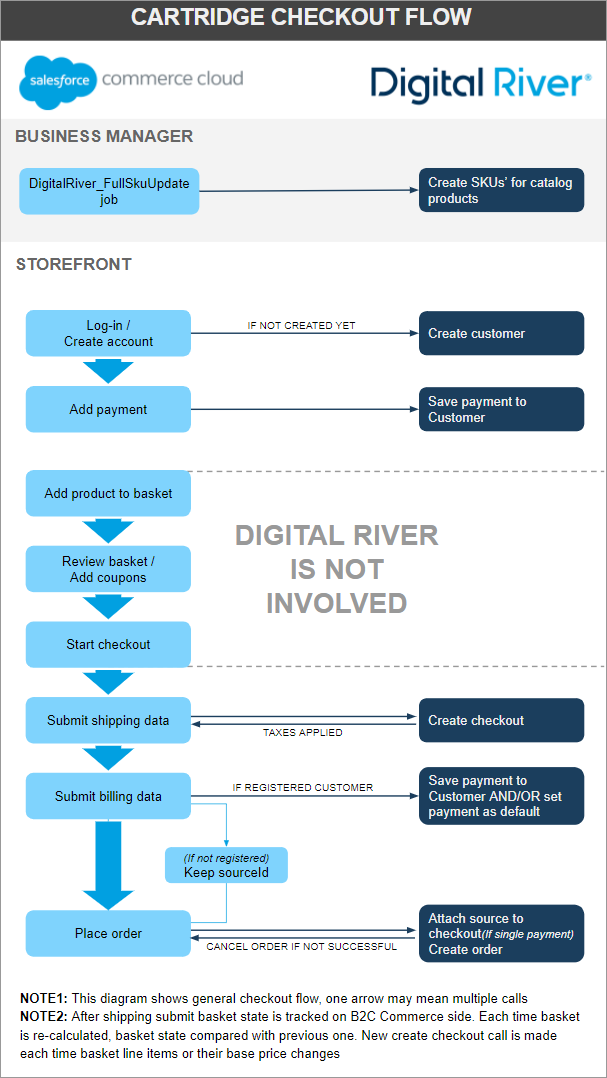
## Checkout flow
The following sequence diagram shows the checkout interaction between the Shopper, Salesforce B2C Commerce, the Salesforce B2C Commerce App, and Digital River.
{% file src="/files/308eKGjChY9X1gvdiRKf" %}
## US tax exemption flow
The following sequence diagram shows the US tax exemption interaction between the Shopper, Salesforce B2C Commerce, the Salesforce B2C Commerce App, and Digital River.
{% file src="/files/RVFeyaczorXKfOMvMCJq" %}
SalesforceB2CUSTaxExemptionFlow-2.1.png
{% endfile %}
## Tax identifier flow
The following sequence diagram shows the tax identifier interaction between the Shopper, Salesforce B2C Commerce, the Salesforce B2C Commerce App, and Digital River.
{% file src="/files/-Mb8jnlUsNooZEmImi7s" %}
SalesforceB2C\_TaxIdentifierFlow-2.1.png
{% endfile %}
## Customer credit flow
The following sequence diagram shows the interaction of the customer credit functionality with the Shopper, Salesforce B2C Commerce, the Salesforce B2C Commerce App, and Digital River.
{% file src="/files/YRBh4w7Lt2b9uSmEt2A8" %}
## Dynamic pricing flow
The following sequence diagram shows the interaction of the [dynamic pricing](/salesforce-b2c-link-cartridge/salesforce-b2c-link-cartridge-3.2/configure-the-salesforce-b2c-link-cartridge/configure-dynamic-pricing.md) flow with the Shopper, Salesforce B2C Commerce, the Salesforce B2C Commerce App, and Digital River.
{% file src="/files/dCOg92W4gRpTJmDnBZgR" %}
## Shipping quotes flow
The following sequence diagram shows the interaction of [shipping quotes](/salesforce-b2c-link-cartridge/salesforce-b2c-link-cartridge-3.2/configure-the-salesforce-b2c-link-cartridge/configure-digital-river-shipping-options.md#configuring-digital-river-shipping-options) functionality with Shopper, Salesforce B2C Commerce, and Digital River.
{% file src="/files/Xpt0EdPYnM2PsgNuX7Hl" %}
## Privacy and payments
This cartridge accesses customer profile data to send the SFCC Customer ID and email to Digital River.
Digital River provides Payment Card Industry (PCI) compliance, tokenization, and fraud screening through an API reference (Digital River is a Level 1 PCI-compliant service provider).
Enter payment information at checkout to interact with secure payment fields—DigitalRiver.js provides the secure fields within a Salesforce-hosted page; Digital River never redirects a shopper to another page.
When brands use this cartridge on their Salesforce store, Digital River:
* Provides payment methods
* Validates card data
* Tokenizes customer information
* Performs fraud screening
* Collects sensitive card data
* Processes transactions in a manner fully compliant with the Payment Card Industry Data Security Standards (PCI DSS).
Digital River stores customer payment data on secure servers, never on Salesforce servers.
For additional privacy information, contact your DigitaAccount Manager.