> For the complete documentation index, see [llms.txt](https://docs.digitalriver.com/adobe-commerce-extension/llms.txt). Markdown versions of documentation pages are available by appending `.md` to page URLs; this page is available as [Markdown](https://docs.digitalriver.com/adobe-commerce-extension/adobe-commerce-extension-4.1/configure-the-digital-river-extension/digital-river-columns-in-the-magento-admin-ui.md).
# Digital River columns in the Magento Admin UI
Understand the Digital River columns in the Magento Admin UI.
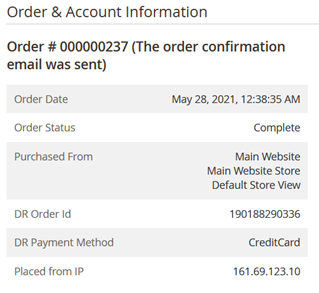
Digital River's extension adds two columns to the Sales Orders grid: **DR Order ID** and **DR Payment Method**. To access the Sales Orders grid, select **Sales**, and then select **Orders** using the **Columns** dropdown.
| **Sales Orders Grid** | Description |
| --------------------- | ---------------------------------------------------------------------------------------------------------------------------------------------------------------------------------------------------------------------------------------------------------------------------------------------------------------------------------------------------------------------------------------------------------------------------------------------------------------------------------------------- |
| DR Order ID | Lists the primary order identification number in Digital River’s systems.
Note: The Magento Commerce ID is a secondary ID in Digital River’s systems. 
|
| DR Payment Method | Replaces the standard Payment Method column. One or both can be used, however, the Payment Method column will always display DigitalRiver Payments, where the DR Payment Method will display the actual payment method used on the transaction.
|